


Amazing Aurora
4.319.00 Reviews
App Specs
- Version
- 12.1.2
- Updated On
- License
- Free
- Downloads
- 10,000+
- Developer
- Sharp Rock Ventures
- Categories
- Weather
- Platform
- Android
Screenshots
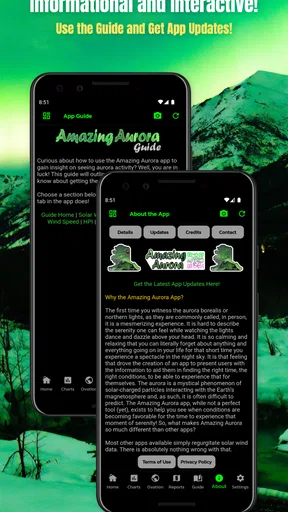
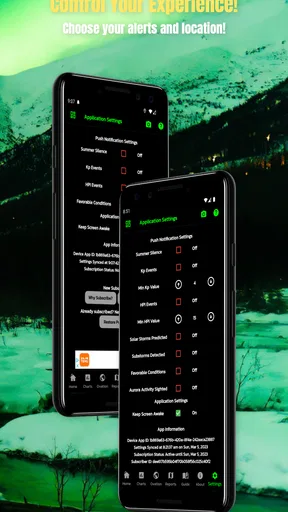
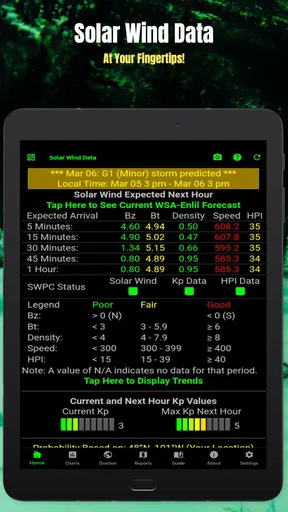
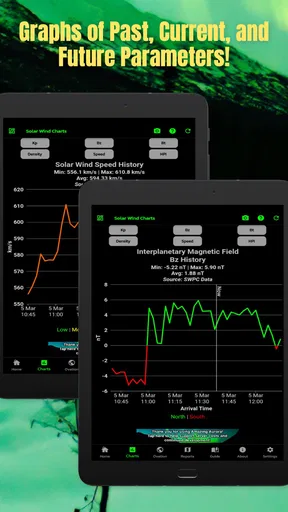
 Analysis by AppCompare
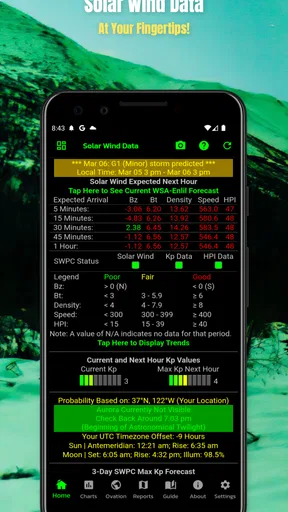
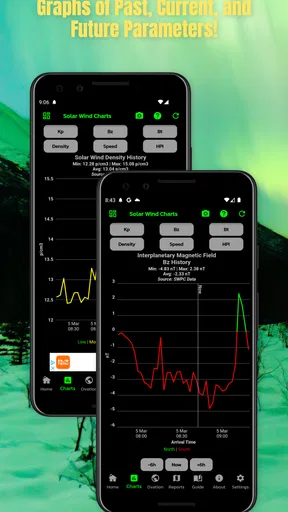
If you are hoping to see the northern lights, the hardest part is often not knowing where to look, but knowing whether it is worth making the effort tonight. Amazing Aurora is a free weather app from Sharp Rock Ventures built around that decision. Rather than trying to replace a full daily forecast, it focuses on the potential to view the aurora and gives the subject a much narrower, more practical purpose.
I found that focus useful because aurora chasing is different from checking whether it will rain. A normal weather app can tell you about clouds, temperature, or wind, but it may not help you decide whether a late-night drive, a walk away from city lights, or a planned viewing trip has a reasonable chance of paying off. This app is aimed at that specific moment of uncertainty.
That narrow purpose is also the key to deciding whether it belongs on your phone. If you want one application for every kind of weather question, this is probably too specialized. If you already check general forecasts and want a separate tool for aurora possibilities, it offers a simpler route into the subject. I would describe it as a decision aid for sky watchers, not as a complete replacement for an everyday weather service.
What I looked for before relying on it
Before I rely on a specialized forecast, I want to know what decision it can actually support and what still needs checking elsewhere. Here I look at how I’d use an aurora outlook alongside ordinary local weather, and why I treat it as a prompt to investigate rather than a guarantee of a sighting.
A focused tool rather than another general forecast
My first test was whether the app made the aurora question easier to answer. That matters more than having a long list of weather screens. A person deciding whether to go outside needs a quick sense of opportunity, followed by enough context to avoid wasting time. Amazing Aurora is most appealing when used as the first step in that process.
The app sits in the weather category, but its identity is much more specific than that label suggests. I would not open it to plan a commute or decide whether to carry an umbrella. I would open it when the sky is clear enough to make aurora viewing plausible and I want a dedicated indication of whether the night deserves attention.
That distinction helps prevent a common mistake: treating an aurora possibility as a promise. No app can turn a forecast signal into a guaranteed display above your home. Clouds, light pollution, local visibility, timing, and your exact position still matter. I use the app as a reason to investigate further, not as permission to assume the lights will appear.
Worth Reading Before You Choose

EA SPORTS FC Mobile 26 Is a Bigger Football Game, but It Takes Time

Flipboard Shows What News Apps Must Do Beyond the Feed

Switching to Android Auto Means Rethinking Your Driving Routine

Google Calendar Makes a Crowded Week Easier to Manage

Ludo King Makes the Most of the Minutes Between Plans

Baby Panda World Brings Quick Play to Modern Phones, but Its Game Library Feels Busy
The practical questions a viewer needs answered
Before installing a specialized aurora app, I would ask four questions. Does it help me decide when to check the sky? Can I use it without learning a complicated system? Does it complement my normal weather app? And is the information useful enough to justify keeping another weather tool installed?
Amazing Aurora makes the most sense when the answer to the third question is yes. I would keep a conventional forecast app for clouds and local conditions, then use this one for the aurora-specific part of the decision. That two-app workflow may sound less convenient than an all-in-one solution, but it can be clearer because each app has a defined job.
There is also a timing issue. Aurora viewing is not always a spontaneous activity. You may need to dress warmly, find a darker location, arrange transport, or wake up at an inconvenient hour. A dedicated indicator is valuable because it can prompt you to start checking those practical details earlier instead of discovering a possible opportunity after you have already gone to bed.
How I would read its signals responsibly
I would never use a favorable indication by itself. My routine would be to check Amazing Aurora first, then compare the result with a normal local forecast. If cloud cover looks poor, the aurora potential may be irrelevant from my location. If the general forecast looks favorable, I would still step outside and allow time for my eyes to adjust rather than expecting an immediate bright display.
This is one of the app’s less obvious strengths: it can make the viewing process more deliberate. Instead of casually refreshing a general weather app, I can use a repeatable sequence. First check the aurora potential, then check local sky conditions, then decide whether the journey and waiting time are reasonable. That workflow is more useful than treating the app as a magic yes-or-no button.
Who will get the most from it
The best audience is someone who already has a real interest in auroras but does not want to study specialist forecasting tools. It may suit a beginner planning a first serious attempt, a traveler choosing whether to spend an evening outdoors, or an occasional sky watcher who wants a dedicated reminder to look up.
It can also help families and couples make a quick shared decision. If someone suggests going outside to look for the lights, the app gives the conversation a practical starting point. You can check the possibility before gathering coats, driving away from bright streets, or keeping children awake for an event that may not be worth the disruption.
I would be more cautious recommending it to professional photographers, experienced aurora chasers, or anyone who needs a broad collection of atmospheric and astronomical details in one place. Those users may prefer a more technical service with deeper controls and more supporting information. Amazing Aurora’s value comes from focus and accessibility, not from being an all-purpose command center.
Where the app earns its place
For me, a specialist app earns a lasting place when it changes a real choice, not merely when its subject is exciting. I consider the routines where an aurora check can help with timing and preparation, as well as the point at which another forecast or a simpler setup makes more sense.
A clear purpose that is easy to remember
The clearest advantage is that the app does not force the aurora question into a general weather routine. Its purpose is immediately understandable: use it when you want information about the potential to view the aurora. That makes it easier to remember than a crowded weather application where specialized information may be buried among unrelated forecasts.
I also like the psychological benefit of a dedicated tool. Aurora viewing often involves uncertainty, and a focused app can reduce the friction of getting started. You do not need to search through several unrelated panels just to decide whether tonight deserves a closer look. For casual users, that simplicity may be more valuable than a technically richer interface.
A useful companion for an everyday viewing plan
Imagine I am visiting a rural area during a cold weekend. After dinner, I check the ordinary forecast and see that the sky may be suitable. I then open Amazing Aurora to see whether there is enough potential to justify putting on several layers and walking away from the nearby lights. If the outlook is encouraging, I choose a safe viewing spot, bring a charged phone, and give myself time to wait rather than making a rushed decision.
In that scenario, the app is not doing everything. It is helping with the most specialized part of the decision while the normal weather service handles the local conditions. That division of labor is realistic and, in my view, better than expecting one small app to replace every source of information involved in an outdoor plan.
A second use case is deciding whether to interrupt sleep. If the aurora possibility looks promising later, I can prepare in advance: place warm clothes nearby, check the route, and decide whether the location is safe at night. The useful insight here is that the app can support preparation even when I ultimately do not go outside. It turns a vague hope into a simple plan with a clear stopping point.
Approachable for people who are not experts
The app’s free price also lowers the barrier to trying a specialized weather tool. You can explore whether an aurora-focused workflow fits your habits without making an immediate purchase decision. That is particularly helpful for newcomers who are still learning what information matters to them.
Its age rating of Everyone makes the idea accessible to a broad audience, although younger users should still be accompanied appropriately for late-night outdoor viewing. The rating describes the app’s general suitability, not whether a particular viewing trip is safe. Darkness, cold, remote locations, and driving conditions remain adult planning responsibilities.
I would also consider the current version, 12.1.2, a practical reason to judge the app by its present experience rather than by older impressions. It supports devices running Android 7.0 or later, which covers many older phones but still gives users with very old hardware a compatibility point to check before planning around it.
What its audience response suggests
The app has an average rating of 4.3 from around fifty ratings, with around twenty written reviews. That is a small sample, so I would treat it as an encouraging signal rather than definitive proof that it will suit everyone. Still, the response suggests that the focused concept connects with at least part of its intended audience.
There are also over ten thousand installs, which gives the app a modest but meaningful user base for such a specific weather purpose. I would not choose it because of the install count alone. The more important point is that it appears to have found a real audience among people who want aurora information separated from their everyday forecast.
Small habits that make it more useful
My first tip is to check it before making commitments, not after leaving home. If you are already standing under a bright urban sky, an unfavorable view may reflect your surroundings rather than the entire opportunity. Checking early gives you time to choose a darker location or decide that the effort is not worthwhile.
My second tip is to use it as a trigger for verification. When the app suggests potential, immediately look at the local forecast and the practical conditions around your intended viewing spot. This prevents the common trade-off of gaining a specialized signal while ignoring the clouds, wind, temperature, or travel time that determine whether you can actually enjoy it.
My third tip is to create a personal threshold instead of chasing every positive indication. For a nearby backyard, a modest possibility may be enough. For a long drive or a family outing, I would require a more convincing overall situation. The app can inform that threshold, but it cannot choose it for you.
Where the experience may feel limited
The same specialization that makes Amazing Aurora approachable may feel restrictive if you want a complete weather dashboard. I would not install it expecting detailed planning for ordinary outdoor activities. Its usefulness depends on caring about aurora viewing specifically, and that means it may spend most of its time unused between opportunities.
Another limitation is interpretive rather than technical. A potential viewing indication is easy to misunderstand, especially for someone new to auroras. The app may encourage optimism, but the real-world result still depends on visibility and patience. If you want a guaranteed event, no forecast-based tool can satisfy that expectation.
There is also a practical switching cost. If your current weather app already includes aurora information that you understand, adding another app may create duplicated checks instead of saving time. I would switch only if Amazing Aurora makes the aurora decision noticeably clearer or easier than the tool I already use.
When a different category is the better choice
A general weather app is better for daily life. If your main concerns are rain, temperature, severe conditions, or planning a normal trip, a broad forecast service will probably deserve the home-screen space. Amazing Aurora should be the specialist companion, not the default answer to every weather question.
A more technical astronomy or sky-monitoring service may be better for users who want extensive context, detailed interpretation, or a wider range of celestial events. I would choose that category when I am willing to spend time learning the information and checking several variables before making a decision.
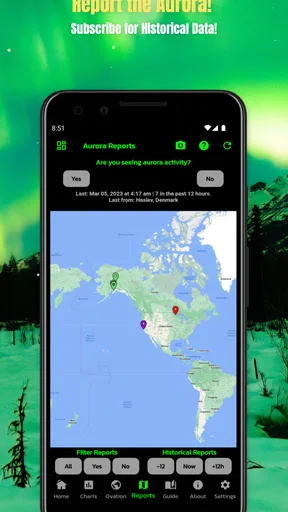
A community-based viewing service may suit someone whose priority is hearing from other observers nearby. That kind of tool can add local human context, while Amazing Aurora’s appeal is a more direct, individual check. Neither approach is automatically superior; the right choice depends on whether you prefer a focused forecast signal or shared reports from people in the field.
What switching may cost
Because the app is free to install, the main cost of switching is attention rather than the initial purchase. You need to build a new habit, decide which app handles which question, and avoid checking both without a clear reason. For occasional users, that extra step may outweigh the benefit.
In-app purchases range from $0.99 to $14.99 per item. I would therefore explore the free experience first and only consider an optional purchase if it solves a specific problem in my own routine. A paid addition is easier to justify for frequent observers than for someone who checks the sky only during a rare trip.
My preferred approach would be gradual. Keep the existing weather app, use Amazing Aurora alongside it for several viewing decisions, and compare whether the dedicated check changes what you do. If it helps you avoid pointless outings or catch opportunities you would otherwise miss, it has earned a place. If you still open the general forecast first and never use the specialist information, uninstalling it is a sensible outcome.
My recommendation for different readers
I recommend Amazing Aurora to beginners and casual enthusiasts who want a straightforward way to check aurora potential without committing to a complicated forecasting setup. It is especially suitable when you are planning an evening outdoors and need a quick specialist signal before checking the rest of the conditions.
I would also recommend it to travelers who are visiting a region where aurora viewing is part of the experience. Use it during the planning stage, not as a promise that the trip will produce a display. Pair it with a local forecast, a safe route, suitable clothing, and realistic expectations about waiting.
I would skip it if you rarely care about the aurora, if your current weather app already handles this need well, or if you want one comprehensive tool for all weather and astronomy tasks. In those cases, the extra app may add another icon without adding enough decision-making value.
Overall, Amazing Aurora succeeds because it stays centered on one question that ordinary weather apps do not always make easy to answer: is there enough potential to make looking for the aurora worthwhile? I like it as a focused companion rather than a complete forecast replacement. Its best use is simple and realistic—check the aurora possibility, verify local conditions elsewhere, then decide whether the effort fits the night.
That makes my final recommendation positive but specific. Install it if aurora viewing is an occasional or growing interest and you value a dedicated starting point. Keep your expectations grounded, test it against your existing routine, and judge it by whether it improves your decisions. For that audience, this free weather app from Sharp Rock Ventures is a practical addition; for everyone else, its narrow purpose is a good reason to look elsewhere.
Pros
- Captures aurora activity in a visually appealing
- easy-to-follow format.
- Useful for planning nighttime viewing with timely space-weather information.
- Clean interface makes key forecasts quick to find.
- Can help beginners understand basic aurora terminology and conditions.
- Provides an engaging way to follow solar activity even when skies are cloudy.
Cons
- Aurora visibility predictions can be inaccurate because local weather changes quickly.
- Some features may require an internet connection or updated location access.
- Bright visuals and alerts may consume extra battery during extended use.
- Forecast quality can vary depending on location and available space-weather data.
- Best results are limited in areas with heavy light pollution.
FAQs for Amazing Aurora
What is Amazing Aurora, and what can I do with it?
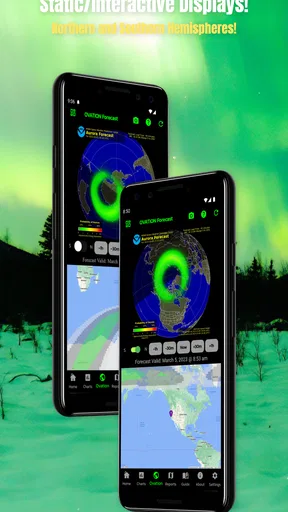
Amazing Aurora is an aurora-focused app designed to help users discover, track, and enjoy information about the Northern Lights. Depending on the available features, it may provide aurora forecasts, activity levels, visibility information, maps, alerts, and educational content. It is especially useful for travelers, photographers, and anyone who wants to improve their chances of seeing this natural phenomenon.
Does Amazing Aurora show real-time aurora forecasts and notifications?
The app is intended to provide aurora activity information and forecast guidance, helping users understand when conditions may be favorable. Some features may include current solar activity, cloud coverage, visibility predictions, or push notifications for increased aurora chances. Forecast accuracy can vary because auroras depend on changing space-weather and local weather conditions, so the information should be treated as guidance rather than a guarantee.
Does Amazing Aurora require my location or an internet connection?
Amazing Aurora may request location access to provide more relevant forecasts, visibility estimates, nearby viewing recommendations, or alerts for your area. You can usually choose whether to grant precise or approximate location permission, although some personalized features may work less accurately without it. An internet connection is generally needed to refresh forecasts, maps, weather data, and space-weather information.
Is Amazing Aurora free to download, and are there in-app purchases?
Before downloading, users should check the current store listing because pricing, subscriptions, advertisements, and premium features can change between Android and iOS versions. The app may offer basic aurora information for free while reserving advanced forecasts, extended predictions, detailed maps, or unlimited alerts for a paid plan. Review the subscription terms carefully, including renewal and cancellation conditions.
How accurate is Amazing Aurora for planning an aurora-viewing trip?
Amazing Aurora can be a helpful planning tool, but no aurora app can promise that the Northern Lights will appear at a specific time or location. Solar activity, darkness, cloud cover, light pollution, and local visibility can change quickly. For the best results, use the app together with a reliable weather service, choose a dark viewing location, and remain flexible with your plans.


